Most SaaS companies don’t have a shortage of tools. They have a stack full of software that handles separate jobs while customers keep slipping through the gaps.
A team may publish useful content that search engines struggle to index. Visitors reach the website but can’t quickly picture how the product fits into their work. Leads enter the CRM, yet sales has little context about what each person viewed. Customers like the product, but referrals still arrive through scattered emails and private messages.
A sensible growth stack connects those moments. It helps people find the product, understand it, try it, and keep using it.
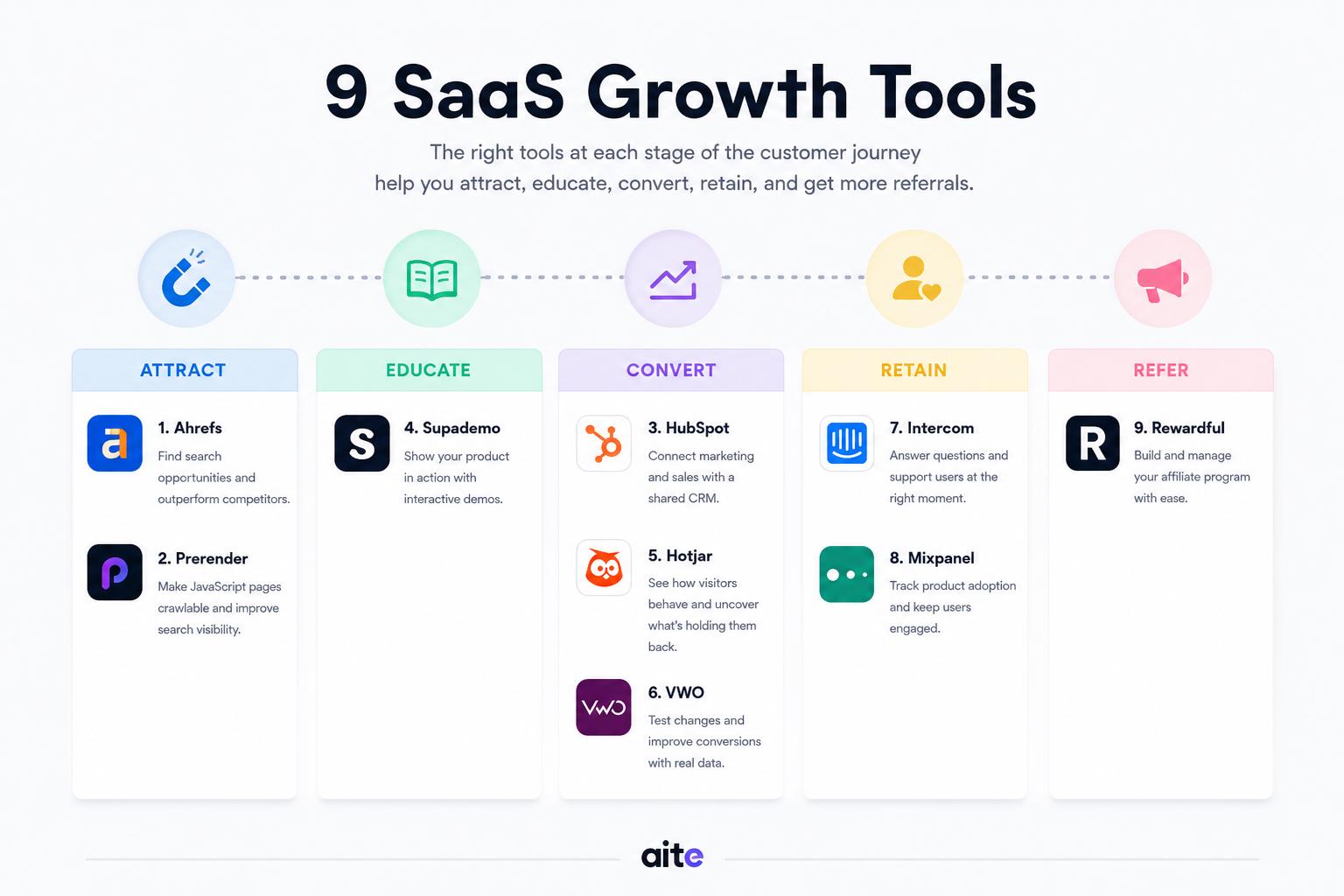
The nine tools below cover different parts of that journey. You probably don’t need all nine. Start with the point where promising customers seem to lose momentum.
1. Ahrefs for Finding Search Opportunities
SaaS teams can burn months publishing content around topics that look relevant but attract the wrong audience.
Ahrefs helps marketers study search demand, compare competing pages, inspect backlinks, and find technical problems. It can also reveal pages that already rank near the first page and may respond better to an update than another brand new article.
That last use is often overlooked.
Imagine a project management platform ranking on page two for a specific workflow problem. The page already has impressions, a few links, and some topical depth. Improving that page may produce results faster than targeting a broad keyword dominated by huge software brands.
Keyword volume is only one signal. The stronger question is whether the search reflects a problem the product can actually solve.
A term with 300 monthly searches may bring more qualified visitors than a broad definition attracting 10,000. The smaller audience may include people comparing tools, looking for a fix, or trying to replace a clumsy process.
Use Ahrefs to find those openings, then apply judgment. A colorful dashboard can’t tell you whether a topic belongs in your sales journey.
2. Prerender for Making JavaScript Pages Easier to Crawl
Many SaaS websites use JavaScript to load product pages, pricing details, documentation, and interactive features. The site can look polished to a visitor while appearing thin or incomplete to a crawler.
That creates an awkward situation. The company may have strong content, but search engines and AI crawlers can’t always process it reliably.
Prerender creates rendered HTML versions of JavaScript pages for crawlers. Regular visitors still use the interactive website, while bots receive content they can process more easily.
This can be useful for sites built with React, Angular, Vue, or similar frameworks. It doesn’t excuse messy technical SEO, though. Teams still need clear internal links, sensible canonical tags, accurate status codes, and pages with enough substance to deserve visibility.
Before commissioning another batch of articles, check what crawlers can actually see.
Open the site’s most commercially useful pages in a crawler or rendering test. If headings, product copy, pricing details, or internal links disappear, the problem sits deeper than content production.
Fixing that foundation gives every existing page a better chance to be discovered.
3. HubSpot for Keeping Marketing and Sales in the Same Conversation
A growing SaaS company can quickly scatter customer information across form builders, email tools, spreadsheets, calendars, and individual inboxes.
Marketing knows someone downloaded a guide. Sales knows the same person asked about pricing. Support may already have spoken to another employee from the company. Nobody sees the full picture without piecing it together manually.
HubSpot brings much of that activity into a shared CRM.
Marketing teams can manage forms, email campaigns, contact segments, and automated follow ups. Sales teams can track deals, review contact history, schedule meetings, and see which pages a lead has visited.
The value comes from context rather than automation alone.
A visitor who reads one blog post may not need a sales email. Someone who returns three times, views pricing, and opens an implementation guide is sending a different signal.
Automation works better when the message reflects that behavior. A technical buyer may need documentation. A founder comparing plans may want a direct conversation. Sending both people the same polished nurture sequence wastes the information the CRM collected.
HubSpot can organize those signals. The team still has to decide what they mean.
4. Supademo for Showing the Product Before a Sales Call
Screenshots can make a SaaS product look attractive. They don’t always help a buyer understand how the work actually gets done.
A prospect may want to see how a report is created, how an approval moves through the system, or how long setup appears to take. Booking a demo feels excessive when they’re still forming an opinion, while starting a free trial may demand more effort than they’re ready to give.
Interactive product demos sit between those options.
They let visitors click through a focused workflow without creating an account or waiting for a salesperson. The strongest demos usually cover one job clearly rather than dragging the viewer through every menu and feature.
Supademo’s State of Interactive Demos report found that high-performing hero demos often use 10 to 12 steps, short hotspot instructions, and a simple linear path. The report also found that 78 percent of surveyed teams use interactive demos for at least two purposes, including marketing, sales, onboarding, support, and internal training.
That makes sense. A clear product walkthrough can support several moments in the customer journey.
The same demo might appear on a landing page, inside a sales email, in a help article, and during onboarding. But it needs to stay narrow enough to remain useful. A visitor trying to understand one workflow doesn’t need a guided tour of every setting.
Show the job they came to complete. Let the rest of the product wait.
5. Hotjar for Seeing What Visitors Do Before They Leave
Analytics may show that a pricing page has a high exit rate. That number doesn’t explain whether visitors disliked the price, missed the plan comparison, struggled with the page on mobile, or clicked something that didn’t work.
Hotjar helps teams study those details through heatmaps, session recordings, surveys, and funnel analysis.
A recording might show visitors repeatedly clicking a product screenshot that looks interactive. A heatmap may reveal that few people reach the comparison section. A short survey can uncover a concern that never appears in analytics.
Randomly watching recordings gets tedious fast. Start with a clear question.
You might investigate why mobile visitors leave the trial page, whether people notice the product demo, or where prospects hesitate during signup. A defined question helps you spot patterns instead of collecting a pile of interesting but disconnected observations.
The aim isn’t to monitor every movement. It’s to find the moment where the page stops making sense.
6. VWO for Testing Changes With Real Visitors
Once a team spots a possible conversion problem, internal opinions tend to multiply.
Someone wants shorter copy. Someone else wants a larger form. The founder prefers a different headline. Design thinks the button needs more contrast.
VWO gives teams a way to test those ideas with real traffic.
The useful experiments usually begin with evidence. Session recordings may show that visitors pause around pricing. Sales calls may reveal that buyers misunderstand how billing works. Support tickets might expose confusion about setup.
That creates a grounded hypothesis. Clearer billing copy may help more visitors start a trial.
Changing a button color because it came up in a meeting is still an experiment. It just may not teach you much.
Choose a metric that reflects the job of the page. A pricing page may need to increase qualified demo requests. An onboarding screen may need to improve setup completion. A feature page may need to move more people toward a trial.
More clicks can look encouraging while producing fewer serious buyers. The metric needs to follow the customer journey, not flatter the test.
7. Intercom for Answering Questions at the Right Moment
Some SaaS buyers can evaluate a product alone. Others need a quick answer before they’re willing to continue.
Intercom combines live chat, automated messages, support content, and customer communication inside the website or product. It can help a visitor compare plans, guide a new user through setup, or answer a recurring support question without forcing someone to leave the page.
Timing matters.
A chat window that jumps open on every page can feel like a salesperson following someone around a store. Messages work better when they match the context.
A visitor on the pricing page may need help choosing a plan. Someone reading API documentation may have an implementation question. A new customer who has stalled halfway through setup may need a short prompt or a link to the right guide.
Automation can handle common questions. But customers should still be able to reach a person when the answer depends on their account, workflow, or internal setup.
A fast wrong answer isn’t much of a service.
8. Mixpanel for Measuring What Happens After Signup
Marketing analytics explains how people reached the website. Product analytics shows what they did after entering the software.
Mixpanel tracks user actions as events. Teams can build funnels, compare customer groups, study retention, and see which product behaviors appear among customers who stay.
This matters because a signup can look like success while hiding a weak product experience.
A user may create an account and disappear before inviting a teammate, connecting a data source, publishing a project, or completing the action that makes the product useful. Acquisition reports still count the signup. Revenue never arrives.
The team needs to identify the actions that signal real progress. These often include completing setup, using a core feature, inviting another user, returning within a set period, or reaching a measurable outcome inside the product.
Don’t track every click just because you can. A crowded analytics account can become another place where useful signals go to hide.
Start with a small set of events tied to activation and retention. Add more only when they help answer a real product question.
9. Rewardful for Turning Referrals Into a Managed Channel
SaaS referrals often begin informally.
A consultant recommends the product to a client. A creator includes it in a tutorial. A customer introduces another company by email. Someone on the team promises to keep track of who referred whom.
That arrangement works until several partners become involved.
Rewardful helps SaaS companies manage affiliate and referral programs. It connects with Stripe and tracks referrals, recurring commissions, upgrades, downgrades, subscription changes, and cancellations.
The tracking is only one part of a healthy program.
Partners need a product they feel comfortable recommending, a clear understanding of who it’s for, straightforward commission terms, and useful material they can share. They also need communication after joining.
Many programs spend heavily on recruitment and barely think about activation. A large affiliate list can look impressive while most partners never send a qualified visitor.
The stronger signals are partner activity, referred trials, paid conversions, customer quality, and retained revenue.
Five active partners who understand the buyer may contribute more than 100 registrations gathered through a broad recruitment campaign.
Choose Tools Around the Bottleneck
Adding nine platforms in the same quarter will probably create more setup work than growth. Start with the weakest part of the customer journey.
If qualified buyers aren’t finding the website, examine search demand and crawlability. If visitors arrive but struggle to understand the product, improve the way you demonstrate real workflows. If signups are healthy but activation is poor, study product behavior. If customers already recommend the software informally, a managed affiliate program may turn that activity into a repeatable channel.
A smaller stack can work well when each tool has a clear job. The useful question isn’t how many platforms your team owns. It’s whether the stack helps you see where customers hesitate, understand what caused it, and fix the problem without creating another disconnected process.