Key Highlights
- Label printing helps small businesses meet daily shipping needs with fewer mistakes and smoother order handling.
- A dedicated device improves operational efficiency by producing clear, scannable printing labels on demand.
- Better label quality reduces incorrect shipping labels and supports customer satisfaction through on-time delivery.
- Thermal printers can cut ongoing expenses by avoiding ink cartridges and limiting material waste.
- Modern label printers often work with shipping software to simplify the shipping process and carrier selection.
- Over the long run, the right tools can deliver real cost savings and a more consistent customer experience.
If you ship orders often, your label printing needs quickly become part of your everyday shipping process. For small businesses, tiny errors like a wrong address line, a smeared barcode, or slow manual steps can lead to delays, extra fees, and unhappy buyers.
With packages going missing every day due to delivery issues, it makes sense to ask if a label printer is worth it. Many growing businesses eventually decide to buy color label printer systems or thermal label printers to streamline operations, improve label accuracy, and create a more professional shipping workflow.
Let’s break down what makes these printers different and when they best suit your workflow.
What Makes Label Printers Different from Regular Printers?
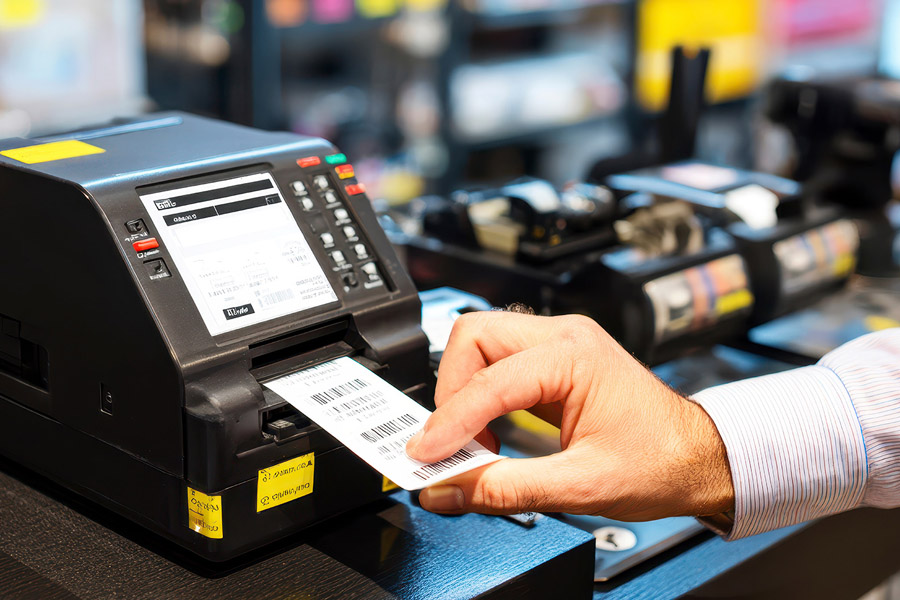
Regular printers can handle many office tasks, but label printing is not their main job. A label printer is a type of printer built to produce consistent, shipping-ready labels with sharp text and barcodes. That matters because illegible or damaged labels can slow carrier workflows and increase the risk of misrouted packages.
From an operational efficiency point of view, the right printer supports faster printing of labels with fewer reprints and less manual work. That’s the main advantage compared with relying on general printing services or a standard device that isn’t designed for label stock. When labels come out clear and accurate, customer satisfaction improves because shipments move through the system with fewer problems.
What Are the Common Uses for Label Printers in eCommerce and Shipping?
In eCommerce, label printers are commonly used for printing shipping labels in the standard 4″ × 6″ format. If you’re shipping regularly on marketplaces like Etsy or Shopify, a dedicated device can feel less like a luxury and more like a practical response to increasing order volumes and tighter fulfillment timelines.
As businesses grow, shipping operations become more demanding. A label printer helps maintain a smoother workflow by allowing teams to print labels as orders come in, reducing reliance on multi-purpose office printers and minimizing interruptions during fulfillment.
Key advantages include:
- Faster order processing during busy sales periods
- Simplified packing station setup with fewer manual steps
- Consistent label sizing that meets major carrier requirements
- Easier batch printing for large groups of orders
- Reduced paper waste compared with standard sheet printing methods
- Better scalability as daily shipment volumes increase
What Are The Major Advantages of Using a Label Printer?
One major benefit is fewer shipping errors. Accurate label printing reduces mix-ups, cuts reprints, and supports operational efficiency when you’re processing many orders. That alone can boost customer satisfaction because packages arrive on time with scannable barcodes.
Another win is cost savings in the long run. Less wasted paper and fewer correction shipments protect your margin. Next, let’s look at how these gains show up during order fulfillment and in how your packages look when they reach the buyer.
1. Time-Saving Benefits in Order Fulfillment
Speed matters when order fulfillment ramps up. If you’re typing details by hand or fighting with the wrong setup, your shipping process slows down and mistakes become more likely. A label printer helps you print fast, consistent labels right when you need them.
For small businesses, that time savings protects customer satisfaction during busy weeks. You spend less effort on reprints, fixes, and troubleshooting, and more effort on getting orders out the door.
Here’s where the time goes back into your day:
- Printing labels on demand instead of waiting on slow, manual steps
- Fewer delays caused by illegible barcodes or misread shipping information
- Less rework from incorrect shipping labels that trigger re-shipping
2. Improved Professionalism and Branding on Packages
First impressions don’t stop at your product. Clean labeling processes create a consistent look that supports brand recognition and leaves a lasting impression when the box shows up at the door. That’s a big reason label printers are often worth buying for small business shipping needs.
Clear, professional labels also support customer trust. When carriers can scan quickly and the address is easy to read, you lower the chance of delays that can damage the customer experience.
A label printer can help you deliver a more polished package by enabling:
- Crisp small text and barcodes that stay readable in transit
- Consistent placement and layout for a more uniform unboxing feel
- Options for label types, including glossy labels, that look professional
Comparing Costs: Label Printers vs. Standard Printers
The initial purchase price depends on the type of printer and how you plan to use it. Some options are positioned for budget-friendly entry, while others are built for heavier shipping operations. Setup costs also vary based on device and software compatibility across Windows, macOS, and mobile devices.
For business owners, it helps to compare a few well-known models that support standard 4″ x 6″ shipping labels. Here’s a quick snapshot of printers highlighted for 2026:
| Printer | Price | Marketplace Compatibility | Device/Software Compatibility | Print Method | Shipping Label Size |
| Rollo Wireless Label Printer | $259.99 | Amazon, Etsy, eBay, Shopify, and more | Mac, Windows, iPhone, iPad, Android | Thermal transfer or direct thermal | 4” x 6” |
| DYMO LabelWriter 4XL | $290 | USPS, FedEx, UPS via major eCommerce sites | Windows and macOS (DYMO Connect) | Thermal printing | 4″ x 6″ and more |
| Zebra ZD421 | $499 | Standard marketplace formats | Supports common setups | Thermal transfer or direct thermal | 4″ x 6″ |
| Brother QL-1100 | $209.99 | Integrates with platforms like Shopify and Etsy | Windows, Linux, Mac, iOS, Android | Direct thermal via thermal head | 4″ x 6″ |
What Are the Essential Features to Look For in Shipping Label Printers?
Choosing the best shipping label printer starts with your specific needs. Think about daily order volume, your shipping requirements, and whether you need 4″ x 6″ output for major carriers. Ease of use matters too, especially when you’re trying to keep the shipping process moving without extra training time.
Also check how well the printer fits your right tools stack. Modern workflows often rely on shipping software to speed label creation and reduce errors. Next, two features matter most for many sellers: thermal printing and smooth platform integration.
1. Thermal Printing Technology and Ink-Free Operation
Many label printers use thermal printers technology, which enables ink-free operation. Instead of ink cartridges, the printer creates the image through heat-based printing on thermal labels, making it a strong fit for frequent shipping needs.
Depending on the model, you may use direct thermal labels or a setup that uses thermal ribbons. Either way, you’re typically working with label stock such as adhesive paper designed for shipping use, which helps keep output consistent and readable.
Key points to confirm before you buy:
- Whether it supports direct thermal or thermal transfer (with thermal ribbons)
- Compatibility with standard thermal labels and adhesive paper formats
- A track record as a reliable printer for repeated, day-to-day printing labels
2. Integration with Online Marketplaces and Shipping Platforms
Setup is usually easier when your printer matches the platforms you already use. Many modern label printers are designed to connect with online marketplaces like Shopify and support common shipping workflows, so you can move from order to label with fewer manual steps.
Shipping software can make this even smoother by automating parts of shipping operations. Tools like ShipBae are positioned to connect with your shipping label printer, simplify label creation, and automate carrier selection, which helps reduce typos in shipping information.
When checking integration, look for:
- Compatibility with marketplaces such as Shopify, Etsy, and others you sell on
- Support for major carriers and standard 4″ x 6″ shipping labels
- Options to print scannable elements like barcodes or a qr code when needed
Conclusion
In conclusion, investing in a label printer can significantly streamline your eCommerce and shipping operations. The benefits of time-saving, improved professionalism, and enhanced branding far outweigh the initial costs associated with purchasing and setting up these devices.
By choosing the right label printer with essential features like thermal printing technology and seamless integration with online platforms, you can elevate your business efficiency and customer satisfaction.
If you haven’t yet considered how a label printer could enhance your workflow, now is the perfect time to explore your options and see the difference it can make for your business!
Frequently Asked Questions
Is it worth it to buy a label printer?
If you ship orders regularly, a label printer can save time, reduce printing costs, and streamline fulfillment. It eliminates the need for cutting and taping paper labels, making daily shipping operations faster, more efficient, and easier to manage.
Can I use any label printer with Shopify?
Most label printers work with Shopify as long as they support the required label sizes and connect properly to your device. Always verify compatibility, printing specifications, and carrier label requirements before choosing a printer for fulfillment.
Is a printer more convenient than a thermal printer for shipping labels?
A standard printer works for occasional shipments, but thermal printers are generally more convenient for frequent shipping. They print faster, require no ink or toner, and produce durable labels designed specifically for carrier and logistics use.
Is a shipping label maker worth the investment?
A shipping label maker is often worthwhile for businesses processing multiple orders each week. The time saved on printing, improved workflow efficiency, and reduction in manual handling can quickly offset the initial purchase cost.
What label printers are compatible with Shopify?
Many popular label printers are compatible with Shopify, including models from Zebra, Rollo, Brother, and DYMO. Compatibility depends on your operating system, connection type, and label size requirements, so always review Shopify’s latest hardware recommendations.
How do shipping label printers work?
Shipping label printers receive digital label data from your computer, marketplace, or shipping software and print it directly onto label stock. Most modern models generate scannable barcodes, addresses, and tracking information in seconds for fulfillment.
Do label printers need ink?
Most shipping label printers use thermal printing technology, which does not require ink, toner, or ribbons. Instead, they apply heat to specially coated labels, reducing maintenance costs and simplifying the printing process for frequent shippers.
How much are label printers?
Label printer prices vary based on features, speed, and print quality. Entry-level thermal models typically cost under $100, while commercial-grade printers can exceed several hundred dollars. Total ownership costs should also include labels and accessories.